


Close Menu
dailybharat
  • Home
  • India
  • World
  • International
  • Sports
  • Finance
  • Tech
  • Health
  • More
    • About Us
    • Cookie policy
    • Contact Us
    • Terms of Use

Subscribe to Updates

Get the latest creative news from FooBar about art, design and business.

What's Hot

Good News! You Can Now Pay Up to ₹10 Lakh via UPI for Big Bills

September 8, 2025

Your Zomato & Swiggy Bills Are About to Get More Expensive, Here’s Why?

September 8, 2025

Inspector Zende – Review Round-Up

September 5, 2025
Facebook X (Twitter) Instagram
dailybharatdailybharat
  • Home
  • India
  • World
  • International
  • Sports
  • Finance
  • Tech
  • Health
  • More
    • About Us
    • Cookie policy
    • Contact Us
    • Terms of Use
dailybharat
Home»Finance»How to Activate Contactless Payments on Your SBI Debit Card, Here’s how to use it
Finance

How to Activate Contactless Payments on Your SBI Debit Card, Here’s how to use it

DB BureauBy DB BureauSeptember 25, 2024No Comments2 Mins Read3 Views
Facebook Twitter Pinterest LinkedIn Telegram Tumblr Email
Share
Facebook Twitter LinkedIn Pinterest Email

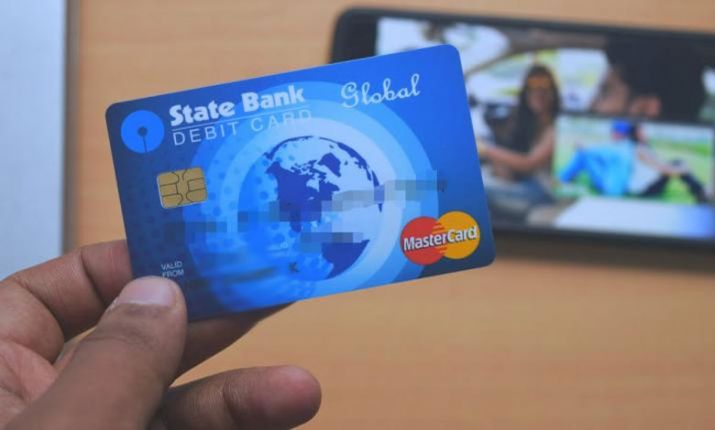
Enabling contactless payments on your SBI debit card is a straightforward process.

In today’s digital age, numerous platforms offer online and mobile payment options, with contactless debit card transactions being one of the most efficient methods. By using contactless payments, you can pay up to Rs 5,000 at any merchant without entering your PIN. This quick and secure method allows you to make transactions seamlessly without the need to swipe or insert your card, making it highly convenient.

If your SBI debit card doesn’t support contactless payments yet, you can easily activate this feature through internet banking. The activation process is simple, giving you the ability to start making swift, secure transactions in just a few minutes.

Steps to Enable Contactless Payments via Net Banking

  1. Visit SBI Internet Banking: Open the SBI online portal at onlinesbi.sbi.
  2. Log in: Enter your username and password to access your account.
  3. Go to Debit Card Services: From the home page, click on “Debit Card Services” in the e-Services section.
  4. Select ATM cum Debit Card: Choose this option to manage your card’s settings.
  5. Select ATM Card Limited Channel Usage Change: This option allows you to modify your debit card usage.
  6. Choose Account Number: Select the account associated with your debit card.
  7. Select Card Number: Pick the card for which you wish to enable contactless payments.
  8. Change Usage Type: Under the usage settings, enable the NFC usage for contactless transactions.
  9. Validate OTP: A One-Time Password (OTP) will be sent to your registered mobile number. Enter the OTP to validate the change.
  10. Confirmation: After validation, a confirmation message will appear. Your SBI debit card is now ready for contactless transactions.

Earn Rewards with Contactless Payments

Using contactless payments with your SBI debit card not only provides convenience but also rewards. Every transaction made through this method earns you reward points. These transactions are particularly secure and are ideal for places where quick payments are essential, such as fast-food outlets, petrol stations, and cinemas. With no need to enter a PIN for purchases up to Rs 5,000, your everyday transactions become faster and more convenient.

Share. Facebook Twitter Pinterest LinkedIn Tumblr Email
DB Bureau
  • Website

Related Posts

Good News! You Can Now Pay Up to ₹10 Lakh via UPI for Big Bills

September 8, 2025

GST 2.0: India’s Bold Tax Makeover – Everything You Need To Know

September 4, 2025

OnePlus 15: What the Latest Rumors Reveal (Sept 2025)

September 2, 2025

UPI down: NPCI issues official statement, explains reason behind brief outage

March 27, 2025

Jio, Airtel, And BSNL Users Are Now Free To Make 4G Calls On all Network: Here’s How It Works!

January 22, 2025

Hindenburg Research founder, CEO Nate Anderson could be charged with securities fraud: Report

January 20, 2025
Leave A Reply Cancel Reply

Good News! You Can Now Pay Up to ₹10 Lakh via UPI for Big Bills

September 8, 2025

Your Zomato & Swiggy Bills Are About to Get More Expensive, Here’s Why?

September 8, 2025
Top Posts

Best Car For Long Drive 2024 (Check Full List)

August 26, 202424 Views

MuscleBlaze: A Benchmark in Whey Protein Excellence

January 8, 202521 Views

Bangladesh PM to Resign? Sheikh Hasina Evacuates Dhaka Palace for ‘Safer Haven’

August 5, 202420 Views

Noel Tata appointed chairman of Tata Trusts: Continuing Ratan Tata’s Legacy at Tata Trusts

October 14, 202419 Views
Don't Miss

Good News! You Can Now Pay Up to ₹10 Lakh via UPI for Big Bills

September 8, 2025

Tired of hitting that ₹1 lakh UPI limit when paying your taxes or a hefty…

Your Zomato & Swiggy Bills Are About to Get More Expensive, Here’s Why?

September 8, 2025

Inspector Zende – Review Round-Up

September 5, 2025

GST 2.0: India’s Bold Tax Makeover – Everything You Need To Know

September 4, 2025
Stay In Touch
  • Facebook
  • Twitter
  • Pinterest
  • Instagram
  • YouTube
  • Vimeo

Subscribe to Updates

Get the latest creative news from SmartMag about art & design.

dailybharat
Facebook X (Twitter) Instagram Pinterest YouTube Dribbble
  • Home
  • India
  • World
  • International
  • Sports
  • Finance
  • Tech
  • Health
  • More
    • About Us
    • Cookie policy
    • Contact Us
    • Terms of Use
© 2026 All Rights Reserved DailyBharat.

Type above and press Enter to search. Press Esc to cancel.